When the Image Model Refuses to Look at a Bra: Engineering Around False-Positive Content Moderation | Eikona
How we built a layer-separation pipeline to automate on-brand creative for a mainstream underwear brand — and why it's still useful even after we moved on.
If you work in creative AI long enough, you learn that building production-grade systems takes more than raw model capability. One of the trickiest challenges is the gap between what a model can do and what it will agree to do.
At Eikona, one of our core capabilities is generating production-ready emails — end to end — for leading brands. To achieve this, we've built an automated creative AI pipeline. But what do you do when one of your partners is a mainstream, mass-market underwear brand — nothing edgy, nothing borderline, the kind of imagery you'd walk past in any department store — and the models refuse to edit their underwear images?
It's a classic vertical-AI problem: building the right stack on top of foundation models so they cross the last mile from co-pilot to production. This is the story of how we solved it. To work it out, we had to think like a model — and then restructure the problem so it was no longer an issue.

Getting the fonts right
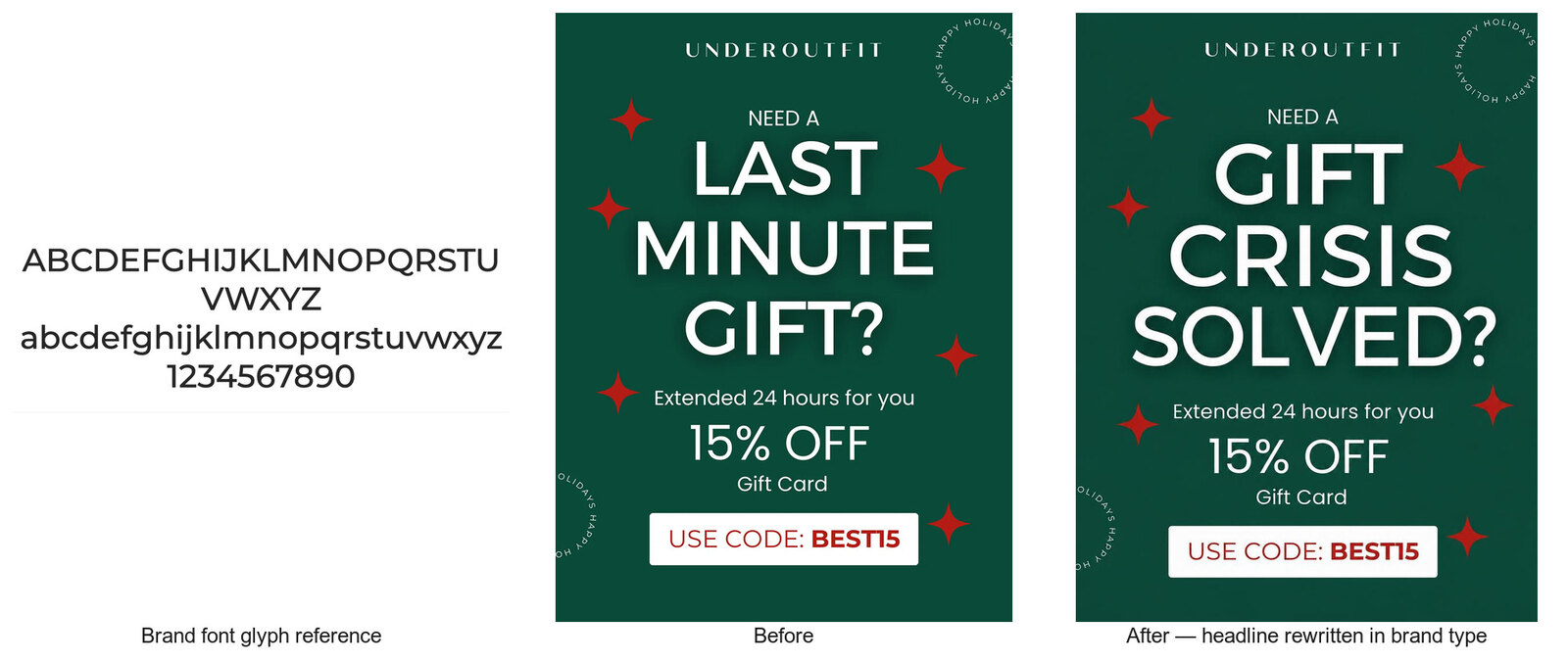
When GPT Image 2 came out, its hybrid auto-regressive reasoning and high output fidelity made it best in class at capturing typography: kerning, weight, character shapes, all of it. We built a technique around that strength — attach an image of the brand font's glyph set as an input reference, and the model can rewrite text in an image while staying perfectly true to the brand typeface.
For a pipeline that needs to generate dozens of hero-image headline variations per campaign, this is enormous. No manual retouching, no fighting with generic AI fonts that are "close enough." Just clean, on-brand type, automatically. Without getting the fonts right, there's no automation — it's just another co-pilot.
Model restrictions and false-positive moderation
There was just one issue. The hero images feature women wearing bras. Because our partner sells bras.
Every time the model saw the full image, the safety filter tripped and the task was blocked. This is a known problem: image models ship with safety features guarding against genuinely harmful content, but those safeties produce many false positives — blocking generation of perfectly legitimate imagery when they shouldn't.
We hit the same wall, intermittently, with Nano Banana. And automated moderation doesn't do nuance; there's no escalation path when a filter decides your Tuesday campaign is a policy violation.
This is a real and underdiscussed gap in the ecosystem: there's a meaningful distance between what's acceptable to show — content that runs on billboards and network TV — and what frontier image models will agree to touch. If you operate in apparel, swimwear, fitness, or beauty, you've probably felt it.
We realized the fix wasn't to argue with the filter. It was to make sure the model doing the text editing never sees anything but text.
The idea: separate the text from the image
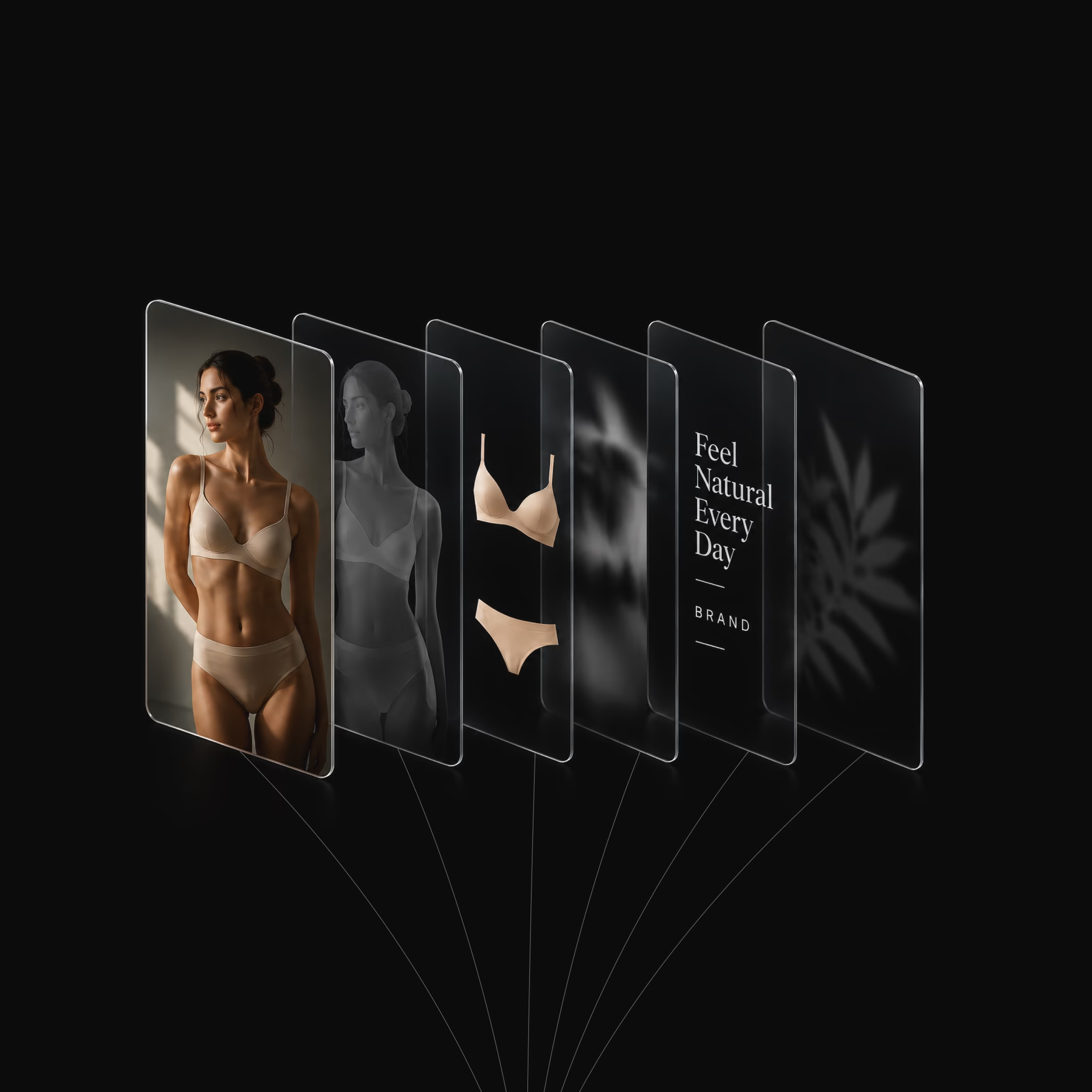
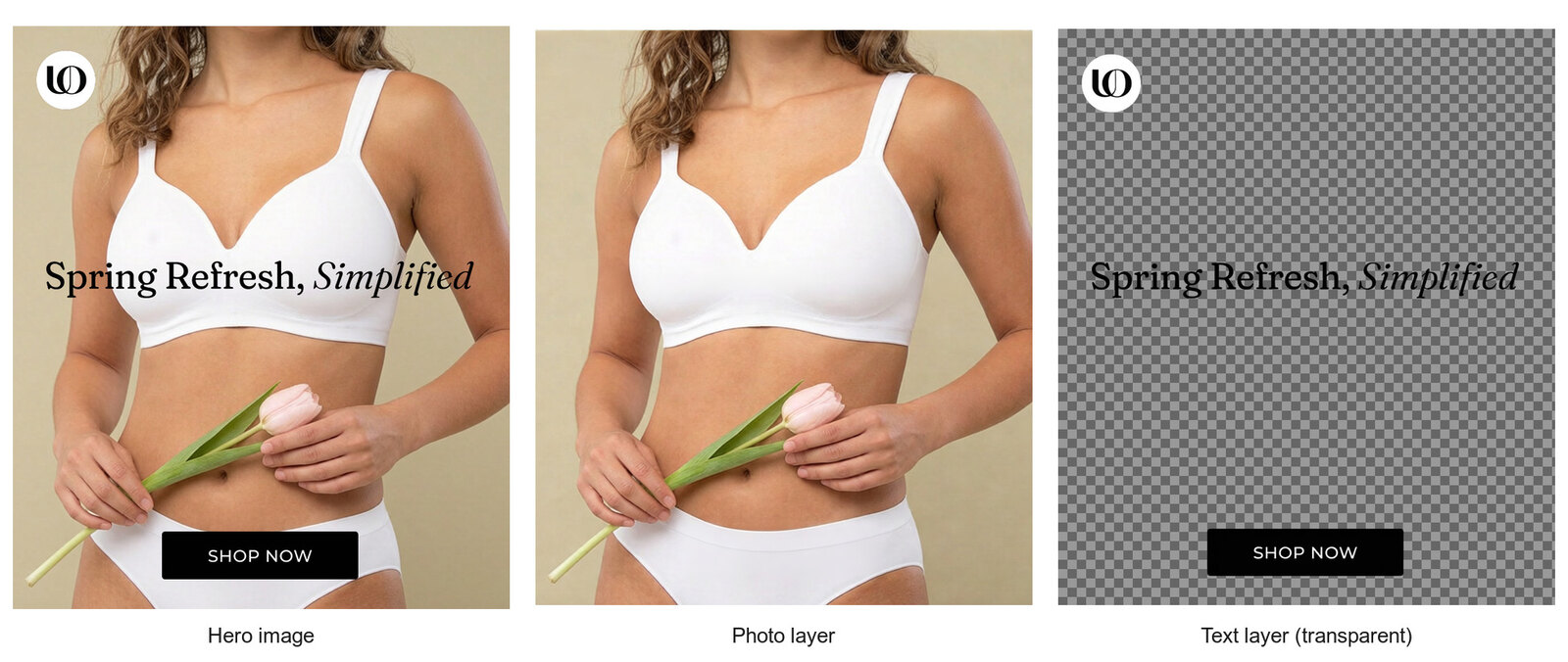
If we could split every hero image into two clean layers — the photographic layer (model, product, background) and the text layer (headline on full transparency) — then each stage of our pipeline could operate only on what it's actually good at, and only on what it's allowed to process.
The text-editing model gets a text layer on a flat background. The photo layer never enters its context. No moderation trigger, because there's genuinely nothing to moderate.
Making Qwen Image Layered actually consistent
The natural tool for this was Qwen Image Layered — an open-source (Apache 2.0) model from the Qwen team that supports alpha channels and was trained to decompose images and graphics into separate RGBA layers. Open weights were exactly what we needed here: full control, and the freedom to fine-tune. Out of the box, though, it wasn't consistent enough for production. Separations were sometimes clean, sometimes not, and "sometimes" doesn't survive contact with an automated pipeline.
So we fine-tuned it. The first step was the dataset — and rather than separating headers by hand, we used Claude to build a synthetic dataset automatically: 200 hero images, each paired with two ground-truth outputs — the photographic layer with the model and product, and the text layer on full transparency. Two paired sets, teaching the model exactly the decomposition we needed, at a scale we could never have reached manually.

Then came the hard part. The first training runs surfaced a failure mode that nearly sank the approach: very small text on the images was getting partially "eaten" during separation — fragments of thin strokes lost to the alpha matte. We traced this to two culprits: the internal resizing of the input, and running inference on an fp8 variant of Qwen Image Layered — together, they made the smaller texts too degraded to distinguish cleanly.
Fixing it took changes across the whole stack — all of it, notably, built on open tooling. The synthetic dataset paid for itself immediately: because generating new training pairs was cheap, we could iterate on the data quickly instead of being stuck with a fixed set. We also moved off the defaults: away from Fal's built-in trainer, which didn't expose several parameters we needed, to Musubi tuner with full AdamW instead of adam8bit; and for inference, from Fal to Modal running the Hugging Face diffusers pipeline for Qwen Image Layered at clean bf16 with our LoRA loaded. For the curious and the deep divers, the final recipe: a LoRA trained for 8,000 steps, AdamW as the optimizer, learning rate 8e-5. With those changes in place, separations came out sharp enough that even fine print survived perfectly intact.
The full pipeline, end to end
With reliable separation in place, the production flow looks like this:
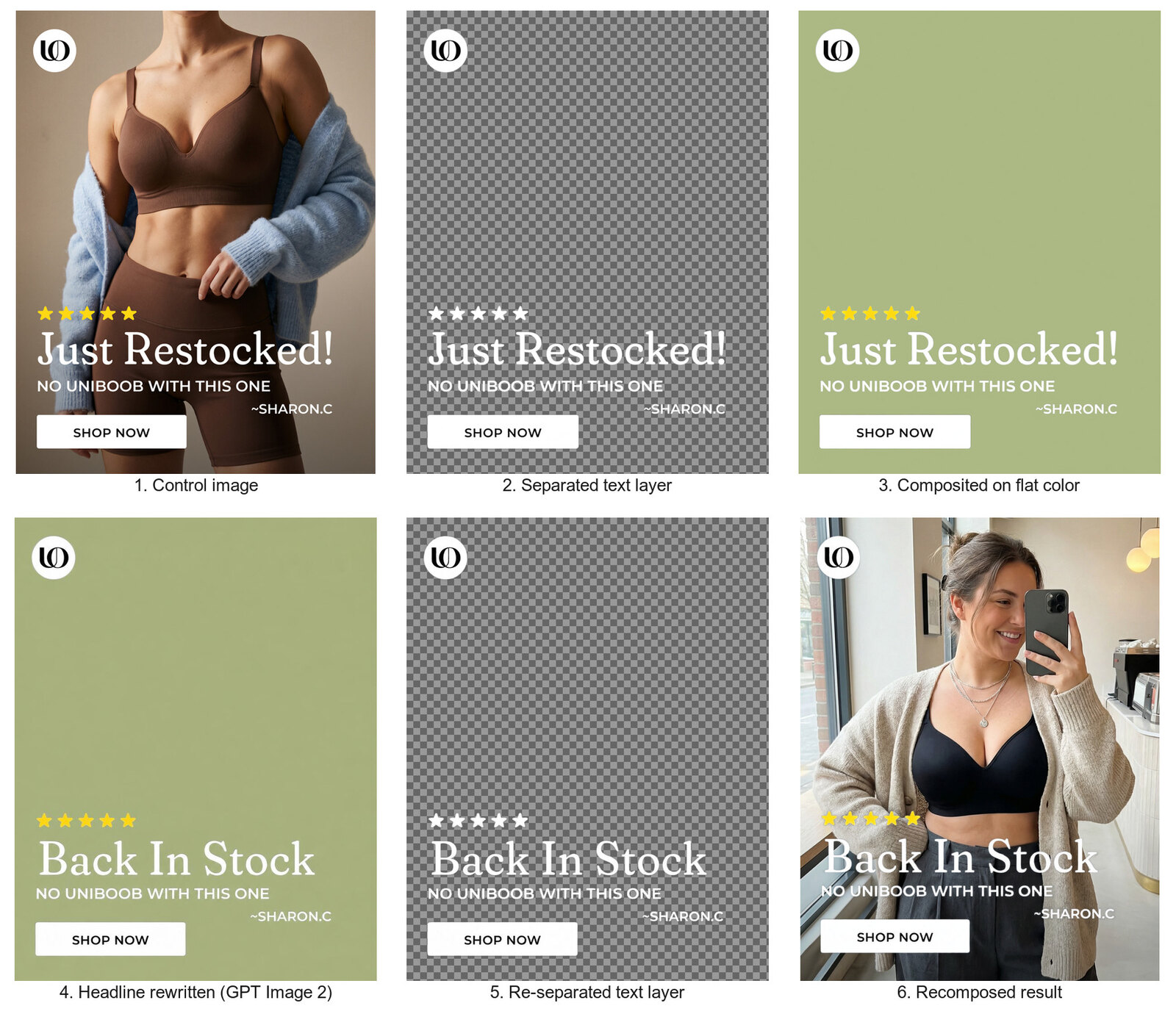
- Separate. The partner's control image goes through our fine-tuned Qwen Image Layered LoRA, splitting it into the photo layer and a transparent text layer.
- Prepare the text. We composite the transparent text layer onto a flat color background — a clean, neutral canvas.
- Edit the headline. That composite goes to GPT Image 2 along with the brand's font glyph reference. It rewrites the headline in perfect brand typography, with zero moderation friction — it's just text on a flat color.
- Clean up. A quick pass through Nano Banana 2 removes any residual artifacts from the edit.
- Re-separate. The edited image goes through a second LoRA — trained specifically to separate text from graphic backgrounds — extracting the new headline back onto transparency, ready for compositing.
The unexpected bonus: full creative freedom on the photo layer
Once text and photography were decoupled, something else opened up. With the text removed, any editing model can be used on the photographic layer — unrestricted editing options, and the freedom to pick models with different strengths and different looks and feels for each job.
Finding the right model for this was its own research track — and the candidate pool was narrow to begin with, since only a handful of capable editing models don't consistently block this kind of imagery. We tested Flux 2, Qwen Image Edit, Seedream v4, and HunyuanImage 3 Instruct. Flux 2 fell short on skin — it just didn't look natural. Qwen Image Edit didn't follow our instructions closely enough, and the results weren't realistic enough.
Seedream v4 was genuinely good — but HunyuanImage 3 Instruct was simply better. We especially loved its skin textures, and it let us change the setting and the model without ever changing the product.

Putting it back together
The final step is simply recomposition: combining the new headline layer with the new photography layer. The output is a full set of hero-image variations — different copy, different photography, all perfectly on-brand — generated automatically from a single control image.

Where this fits now
We've since evolved past this pipeline. Today we use Eikona Studio — a powerful system built on agentic loops and fine-tuned models that creates and designs content end to end, rather than orchestrating a fixed chain of specialized models.
If you're working with brand-compliant content that automated moderation consistently misreads — apparel, swimwear, fitness, medical, beauty — decomposing the creative into layers and routing each layer to the model best suited (and best permitted) to handle it is a robust, production-grade pattern. And fine-tuning editing models is an essential part of that method: it's what takes them from impressive demos to production-ready for your specific vertical task. You're not fighting the filter. You're designing a pipeline where the filter never has a reason to fire.
Sometimes the best way through a wall is to realize you only needed one brick from it.
—
Eikona builds automated creative and performance marketing systems for B2C CRM. Find us at eikona.io.